GRIDCARDCompanion
Finish a Le Mans Ultimate race on the PC, see it on the phone seconds later
The companion watches the Results folder of Le Mans Ultimate (LMU). When a race writes its result, the companion reads the XML on the PC and sends the race data to the paired phone: lap times, sectors, position and tire wear. It also reads the current Le Mans Ultimate Driver and Safety rating and shows it on the driver card.

Both paths install the same app. The Microsoft Store version is certified by Microsoft and updates through the Store. The .exe is the same build, installed per user without admin rights, and the in-app updater keeps it current.
Pairing uses a 6-digit code from the phone app. No email address, password or login is involved.
The companion parses Results.xml on the PC. Only the structured race data ever leaves the machine.
A single tap unpairs it from the phone. Reset & uninstall removes the companion and deletes every LMU race it uploaded.
How to set it up
After setup, the companion sits in the system tray and uploads each new race automatically.
Install
Two install paths, both the same app.
- Microsoft Store
- Installs from the Store with automatic updates.
- Side-loaded .exe
- The installer (~12 MB) runs per user without admin rights, and the in-app updater keeps it current.
Pair with the phone
In the GridCard mobile app: Settings → Integrations → LMU → Pair Windows companion. The phone shows a 6-digit code, valid for 10 minutes, which is entered into the companion to pair the two.
Race
When LMU writes a new Results.xml, the companion reads it and uploads the structured fields. The race appears in the mobile app within seconds. Any results already present in LMU's Log/Results folder at pairing are uploaded as well, so older races are not lost.
The whole race, lap by lap
LFM returns race-level summaries only: finish position, rating and totals. LMU writes a full results file with considerably more detail. The companion reads that file, so every LMU race appears in the mobile app in full: every lap time and sector split, position lap by lap, pit stops and end-of-race tire wear. The companion also reads the current Driver and Safety rating from the sim and shows it on the driver card, and every finished race includes a post-race brief.
Per-race detailPro
Per-lap detail in the mobile app is part of PRO. The companion, the pairing and the upload pipeline are free.
- Current Driver and Safety rating (DR / SR) read from LMU and shown on the driver card
- Every lap time with S1 / S2 / S3 sector splits
- Per-lap position
- End-of-race tire wear
- Pace & consistency graphs over time, per car class
- Per-track records: best lap, best finish, average pace
- Net positions gained and finish-position trends
- Post-race brief showing the Driver and Safety rating change. The push on race finish is free for everyone; the brief is added for PRO subscribers with a paired companion.

LMU driver card
A dedicated LMU card showing live Driver and Safety rating as tier medallions, alongside LMU-only totals and career stats.

Post-race brief
Finish, fastest lap and the Driver and Safety rating change, shown when the race ends.

Full race result
Start and finish position, incidents, laps and the rating change, above the finishing order of every class with each driver's gap and best lap.
What each link exposes
Low Fuel Motorsport lists an LMU race with its result and rating. The companion reads the same race from the PC with the full detail.
| Per-race detail | Linked in the app × × Low Fuel Motorsport Low Fuel Motorsport |
Windows companionLMULe Mans Ultimate |
|---|---|---|
| Finish position & rating delta | ✓ | ✓ |
| Driver Rating (DR) | — | ✓ |
| Safety Rating (SR) | — | ✓ |
| Per-lap times | — | ✓ |
| Sector splits | — | ✓ |
| End-of-race tire wear | — | ✓ |
| Pace & consistency graphs | — | ✓ |
| Lap-time goals | — | ✓ |
| Per-track records | — | ✓ |
| Push on race finish | — | ✓ |
| Post-race brief | — | ✓ |
Companion screens
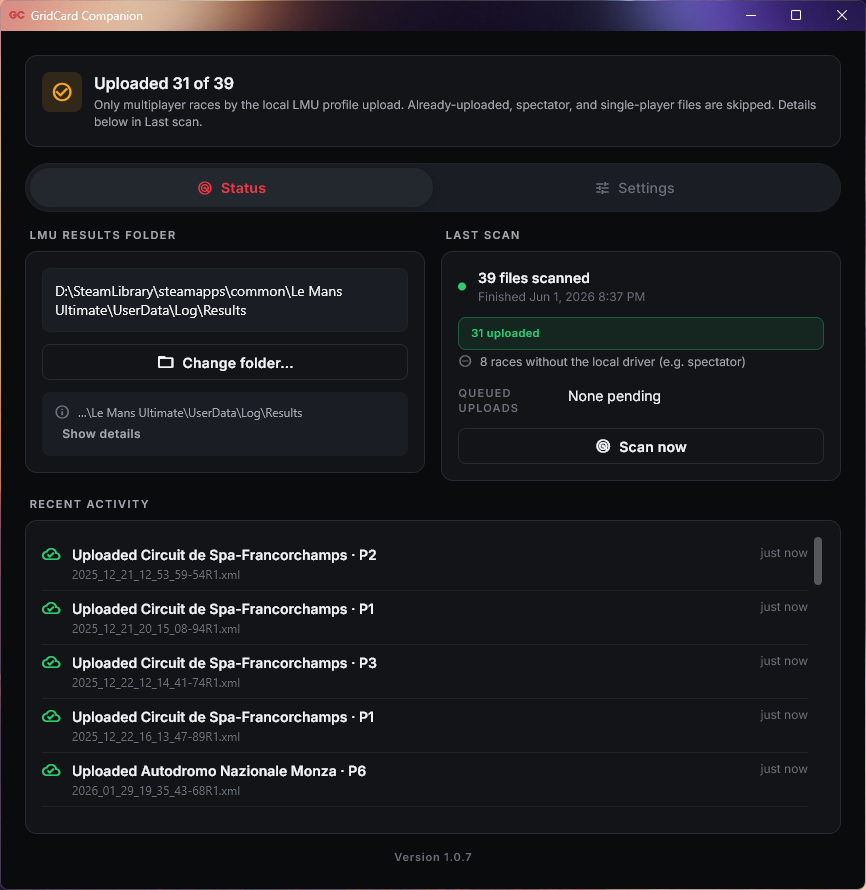
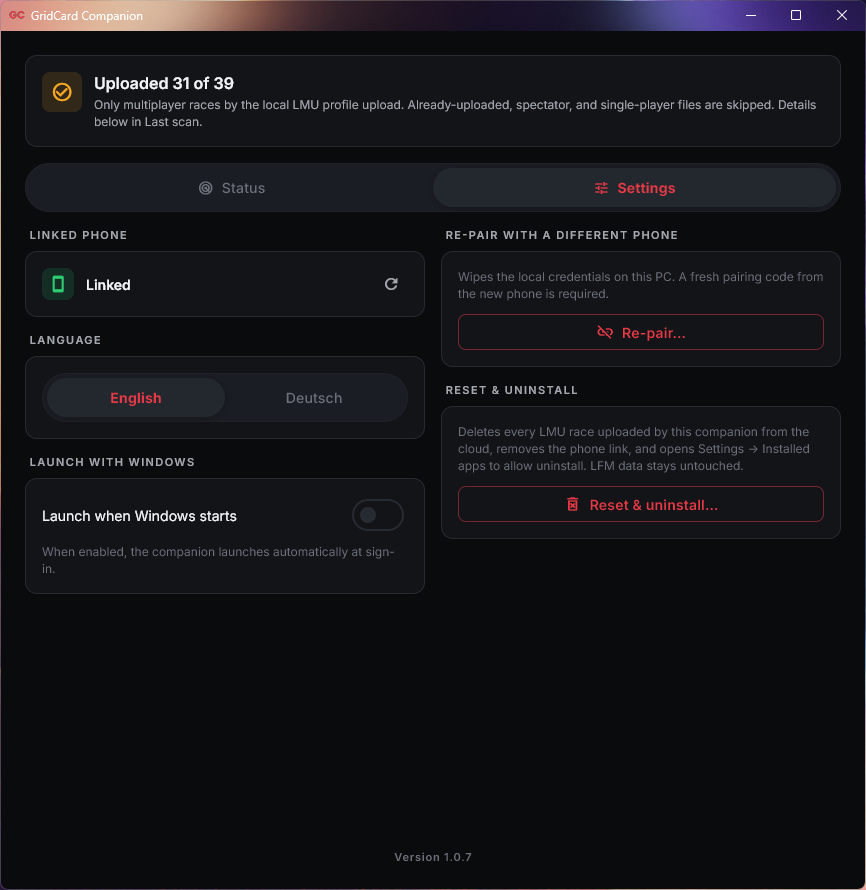
The first run shows a pairing screen. After that, the companion sits in the system tray and opens to a small two-tab panel, Status and Settings.
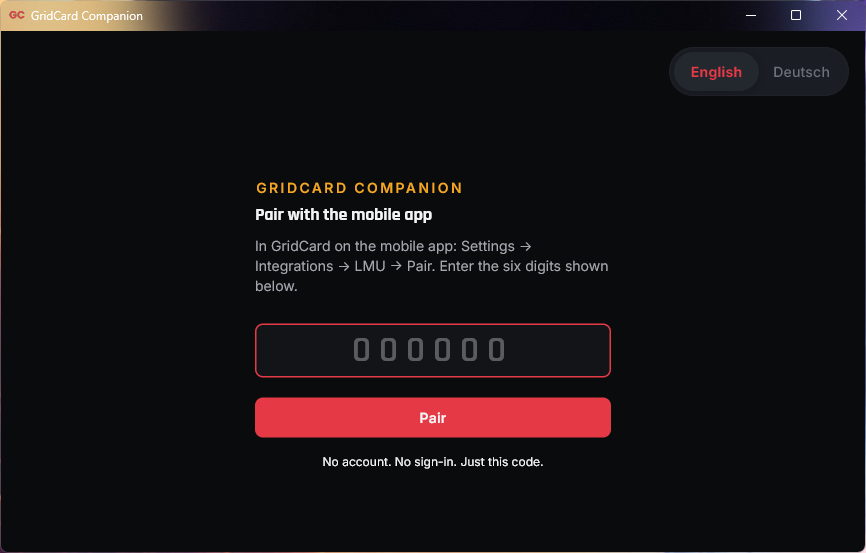
- The first run. The 6-digit code from the phone goes into the one field, and the language toggle sits in the corner.
- The LMU results folder, the last scan with its counts, the upload queue and a feed of every uploaded race.
- The linked phone, the language, the Launch with Windows toggle, re-pair with a different phone, and Reset & uninstall.
Changelog
-
v1.5.0Latest2026-09-16
- The companion now detects an event joker used in LMU. That race shows a Joker badge in the app instead of a Driver and Safety Rating change.
- Driver and Safety Rating now sync with LMU closed, as long as Steam is signed in.
- Other stability and reliability improvements.
-
v1.4.12026-09-04
- Driver and Safety Rating changes record only for ranked races.
- Rating changes no longer appear for moves that never happened.
- Other stability and reliability improvements.
-
v1.4.02026-08-25
- Race classification now uploads with each LMU result, and past races receive a one-time backfill.
- Results recorded while the companion is offline stay queued and upload once the connection returns.
- Driver-name matching covers more LMU profile spellings.
- A failed scan, a lost results folder, or a stalled backfill now surfaces in the companion instead of failing quietly.
- Idle CPU use drops during long sessions, and the results-folder watcher recovers from errors more reliably.
-
v1.3.22026-08-03
- Driver Rating and Safety Rating sync correctly again after the LMU 1.4 backend move to RaceOS.
-
v1.3.12026-07-30
- Races that ended before a valid lap time now upload instead of being refused.
- A result the server cannot accept no longer blocks the races queued behind it.
- English and German interface copy refined for clarity and consistency.
- German text updated to match the renamed Options tab.
- Outdated wording corrected across companion screens.
-
v1.3.02026-07-08
- In-class position now shows the finishing rank within each car's own class for LMU races.
- Past races already on disk receive a one-time in-class-position backfill, so earlier results show class rank too.
- Driver and Safety Rating changes now appear for races finished while the companion was closed.
-
v1.2.02026-06-16
- Driver and Safety Ratings from LMU now sync after each race.
- Team endurance results: multi-driver stint data now shows every driver's contribution in the app.
- Recent activity now shows the newest race at the top during the initial sync, matching the live feed instead of listing oldest-first.
- Team races where the driver swapped out on the final lap now sync correctly.
- The companion now starts in English on first run.
- Companion icon updates and fixes.
-
v1.0.72026-06-01
- Start menu icon redesigned to read clearly at small sizes and adapt to Windows light or dark theme.
-
v1.0.62026-05-23
- Control panel reorganized into Status and Settings tabs. Sync activity stays the main view, configuration is one tap away, and the window sizes to fit each tab.
- Autostart moved from an install-time prompt to a "Launch with Windows" toggle in Settings, controllable at any time.
- Push notifications now fire for LMU races finished within the last 24 hours, including races picked up by the companion's backfill scan after launch.
- LMU Results folder confirmation is skipped when the folder is found at a standard Steam or install path.
- Microsoft Store tiles render at full resolution on the Start menu.